
Aqara U400 Smart Lock Review: Ultra-Wideband Unlocking Changes Everything
The Aqara U400 is the world's first smart lock with Apple UWB Home Key support. After a month of real-world use, here is whether hands-free unlocking lives up to the hype.
A
admin
April 4, 2026 · 10 min read
Review8.5/10
Overall Score
8.5
out of 10Security
8.5
UWB Performance
9
App
8
Battery
8
Value
8.5
The Lock That Knows You Are Coming
I have used smart locks for years. Keypads, fingerprint readers, Bluetooth proximity, NFC taps: they all work, and they all require you to do something. Reach for your phone. Place your finger on a sensor. Type a code. These are small actions, and they are infinitely better than fumbling for keys, but they are still actions. The Aqara U400 is the first smart lock I have used that genuinely requires nothing. You walk to your door. The door unlocks. That is it.
The technology enabling this is Ultra-Wideband, specifically Apple's UWB Home Key implementation. The U400 was the world's first smart lock to support this feature when it debuted at CES 2026, and after a month of daily use, I can say that UWB auto-unlock is not a gimmick. It is the future of how smart locks should work.
But a smart lock is a security device first and a convenience device second. So let us start with whether the U400 keeps your home safe before we talk about how effortlessly it opens.
Installation: Surprisingly Painless
Smart lock installation is the number one source of buyer's remorse in the category. People buy a smart lock expecting a 15-minute project, discover it requires a non-standard bore hole or proprietary mounting plate, and return it. The U400 avoids this pain point with good but not universal compatibility.
The U400 is a deadbolt replacement that fits standard US door preparations with a 2-1/8 inch bore hole and a backset of either 2-3/8 or 2-3/4 inches. If your current deadbolt fits these measurements, and most do, the U400 will work. Aqara includes a measurement guide in the box and a compatibility checker on their website that walks you through the process.
Installation took me approximately 25 minutes, including reading the instructions thoroughly before starting. The process involves removing your existing deadbolt, installing the U400's mounting plate, connecting the interior and exterior assemblies, and securing everything with the included hardware. No drilling is required for standard installations. The instructions are clear, with step-by-step diagrams that are actually helpful rather than confusingly abstract.
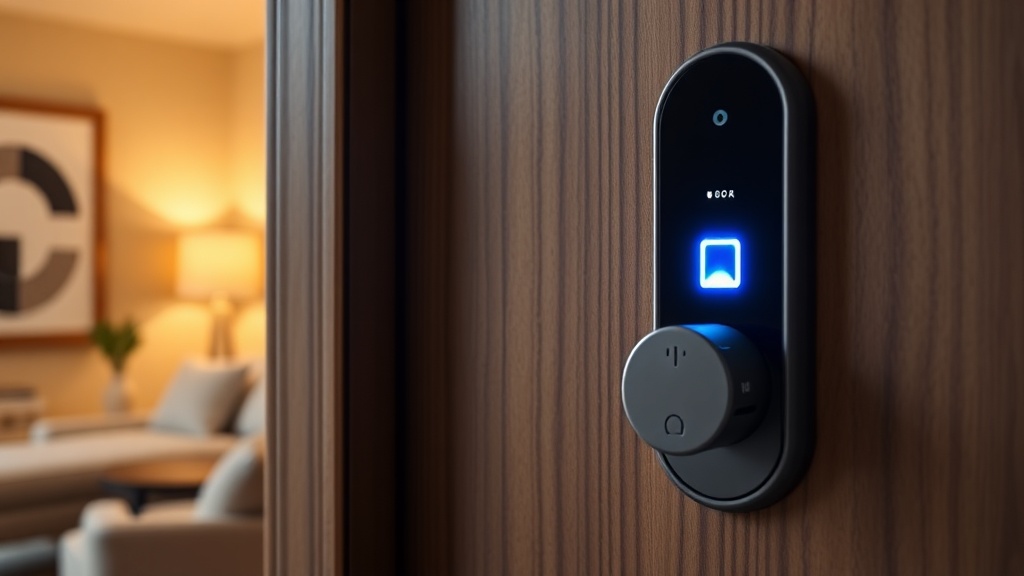
The exterior unit houses the keypad, fingerprint sensor, and NFC reader. The interior unit is the motorized deadbolt mechanism with a manual turn knob for backup. A physical key is also included for emergency access; this is the lock's final failsafe, and you should keep it in a secure location outside your home.
UWB Auto-Unlock: The Headline Feature
Ultra-Wideband technology enables precise spatial awareness between devices. Unlike Bluetooth, which can only estimate distance based on signal strength, UWB measures the actual distance and direction between the lock and your iPhone with centimeter-level accuracy. This precision is what makes auto-unlock reliable rather than theoretical.
Here is how it works in practice: as you approach your front door with your iPhone in your pocket, the U400's UWB radio detects the UWB radio in your phone. When you are within approximately two meters and moving toward the door, the lock authenticates your credential and unlocks. By the time you reach for the handle, the deadbolt has already retracted.
The experience is, to use a word I do not deploy lightly, magical. For the first few days, I instinctively reached for my phone or the keypad out of habit. By the end of the first week, I had retrained myself to simply walk to the door. The transition from "I have to unlock this" to "it is already unlocked" is a fundamental shift in the smart lock experience.
Reliability and Edge Cases
In a month of use, the UWB auto-unlock worked reliably approximately 95 percent of the time. The five percent of failures fell into specific categories:
Approach angle: If I approached the door from an extreme angle, such as walking along the front of my house rather than directly toward the door, the lock occasionally did not trigger until I stood directly in front of it. The UWB antenna seems to perform best when you approach from within roughly 60 degrees of center.
Phone location: When my iPhone was in a back pocket on the side opposite the door, detection was sometimes delayed by one to two seconds. Front pocket, jacket pocket, and hand-held scenarios all worked reliably.
Multiple people: When my partner and I approached the door simultaneously, the lock correctly identified and authenticated the first person whose phone was detected. There was never a situation where it failed to authenticate either of us, though the unlock occasionally triggered slightly later than when approaching alone.
Cold weather: During a particularly cold week in February, I noticed no degradation in UWB performance, though my sample size for extreme weather conditions is limited.
The lock never auto-unlocked when I was merely near the door without approaching it, which was my primary concern before installation. Walking past the front door to get to the mailbox, sitting on the porch, and standing near the door while gardening: none of these triggered an unlock. The directional awareness of UWB is precise enough to distinguish between approaching and simply being nearby.
Compatibility Note
UWB auto-unlock requires an iPhone 11 or newer, excluding the budget SE models. Android users cannot use UWB auto-unlock, as Apple's Home Key with UWB is an Apple-exclusive feature. This is a significant limitation for Android households. Android users can still use all other unlock methods, including NFC, fingerprint, keypad, and app-based control, but the headline feature is iOS-only.
Other Unlock Methods
The U400 is not a one-trick lock. It supports a comprehensive range of access methods:
Fingerprint Reader
The exterior fingerprint sensor is fast and accurate. It consistently authenticated in under one second and handled wet or slightly dirty fingers better than I expected. Registration is straightforward through the Aqara app, and the lock supports multiple fingerprints per user. Accuracy declined slightly in heavy rain during testing, but the keypad serves as an immediate fallback.
Keypad
The exterior keypad supports up to 75 access codes, which is more than any household will need. Codes can be permanent, one-time use, or time-limited. This is useful for granting temporary access to house sitters, dog walkers, contractors, or guests. The keypad has a privacy feature that allows you to enter random digits before your code, preventing smudge-based code guessing.
The keypad is backlit and visible in darkness. The buttons are tactile and provide satisfying feedback. In freezing temperatures, the keypad remained responsive and easy to use with gloves.
NFC
Tapping an iPhone or Apple Watch against the lock's NFC reader unlocks the door instantly. This is the non-UWB version of Home Key: faster than the keypad and fingerprint reader, but it requires you to actively tap the lock rather than simply approaching. It works reliably and is a good option for Apple users who want a quick, intentional unlock without entering a code.
Physical Key
A traditional key is included for emergencies. The keyhole is located on the exterior beneath a discreet cover. If the battery dies, the electronics fail, or you simply need a mechanical backup, the key works. Keep it somewhere accessible but secure, not under the doormat.
App and Voice Control
The Aqara app provides remote lock and unlock capability, activity history, and user management. You can also lock and unlock via voice commands through Siri, Alexa, or Google Assistant. Remote unlock requires a Thread border router in your home, such as an Apple TV 4K or HomePod Mini, to bridge the lock's Thread connection to the internet.
Smart Home Integration
The U400 connects via Matter over Thread, which is the current gold standard for smart home interoperability. This means it works natively with Apple Home, Google Home, Amazon Alexa, Samsung SmartThings, and Home Assistant, all without requiring a proprietary Aqara hub.
Thread connectivity is a significant advantage over older smart locks that relied on Bluetooth or Wi-Fi. Thread is a low-power mesh networking protocol that provides reliable, responsive communication without the range limitations of Bluetooth or the battery drain of Wi-Fi. The U400 joins your Thread network and communicates with your smart home platform through the nearest Thread border router.
In my testing with Apple Home, the lock appeared immediately after setup and responded to commands within one to two seconds. Automation was straightforward: I created routines that lock the door automatically five minutes after it is unlocked, turn on the porch light when the door unlocks after sunset, and send a notification when the lock is accessed by a guest code.
Integration with Google Home and Alexa was similarly smooth, though the UWB auto-unlock feature is exclusive to the Apple Home ecosystem. On other platforms, the lock functions as a standard Matter smart lock with all non-UWB features available.
Security
The Aqara U400 carries an ANSI/BHMA Grade 3 rating, which is the baseline commercial grade. This is the lock's most significant compromise. Grade 1 is the highest rating and is required for commercial applications. Grade 2 is the most common for quality residential locks. Grade 3 is acceptable for residential use but indicates lower resistance to forced entry attempts.
In practical terms, the Grade 3 rating means the U400 is adequate for most residential front doors but may not satisfy security-conscious homeowners who prioritize physical resistance to brute force attacks. The deadbolt itself is standard-gauge steel, and the lock withstands standard consumer-grade forced entry scenarios, but it is not the lock to choose if physical security is your primary concern over smart features.
On the electronic security front, the U400 performs well. UWB authentication is inherently more secure than Bluetooth-based proximity unlock because UWB is resistant to relay attacks, a technique where attackers amplify Bluetooth signals to trick a lock into thinking an authorized device is nearby. The end-to-end encryption used for all wireless communications meets current industry standards.
The lock includes tamper detection that triggers an alarm if someone attempts to force the exterior assembly. Auto-lock can be configured to engage the deadbolt automatically after a specified period, and the lock tracks a complete activity history that records every access event, method used, and user identity.
Battery Life and Power
The U400 runs on a rechargeable lithium battery that Aqara estimates will last approximately six months under normal use. My month of testing does not provide enough data to verify that claim, but the battery indicator has dropped from 100 percent to approximately 82 percent after 30 days, which tracks roughly with a six-month estimate.
When the battery dies, you have options. The battery is removable and charges via a built-in USB-C port, meaning you can charge it away from the door. If you are locked out with a dead battery, you can connect a USB-C cable from a power bank or even your phone to the exterior unit to provide enough power for a single unlock. The physical key also works regardless of battery state.
Six months of battery life is acceptable but not exceptional. Some competing smart locks claim 12 months or more, though those claims are often based on optimistic usage assumptions. The convenience of USB-C charging partially offsets the shorter lifespan; there is no need to keep a specific battery type on hand.
The Aqara App
The Aqara Home app handles setup, user management, access code creation, activity history, and firmware updates. The app is functional and reasonably well-designed, though it has some rough edges.
Setup is straightforward for Apple Home users: scan the Matter QR code, add the lock to your Home, and follow the prompts. The entire process took about five minutes, including connecting the lock to my Thread network.
User management is where the app earns its keep. Adding family members, creating guest codes with time restrictions, and reviewing the access log are all intuitive. The activity history is detailed, showing the exact time, method, and user for every lock and unlock event. This is useful for monitoring access when you are away from home.
The app's weaknesses are primarily cosmetic: the interface lacks the visual polish of Apple Home or the Google Home app, some settings are buried in non-obvious menu locations, and push notifications are occasionally delayed by 30 to 60 seconds. These are minor complaints, and Aqara has been improving the app steadily with updates.
Living With the U400
After a month of daily use, the Aqara U400 has changed how I think about arriving home. The UWB auto-unlock is not just faster than alternatives; it removes the concept of unlocking from the process entirely. I no longer think about my door lock at all, which is the highest compliment a smart home device can receive.
The multi-method approach is valuable for a household with different needs. My partner uses the fingerprint reader as her primary method, finding it faster than waiting for UWB to trigger. Guests receive time-limited keypad codes. The physical key sits in a secure location as a backup that has never been needed.
The lock handles daily life gracefully. Arriving with groceries in both hands: the door is unlocked by the time I reach it. Coming home in the rain and rushing to get inside: no fumbling, no delays. Letting a dog sitter in remotely: a few taps in the app. These are the mundane, practical scenarios that define whether a smart lock is actually smart, and the U400 passes every one.
Who Should Buy the Aqara U400
The U400 is ideal for Apple ecosystem users who want the most seamless smart lock experience available. The UWB auto-unlock is a genuine differentiator, and the Matter over Thread connectivity ensures compatibility with any future smart home platform.
Android users should weigh whether the non-UWB features, fingerprint, keypad, app control, and voice assistant integration, justify the $269.99 price without UWB auto-unlock. These features alone make it a competitive smart lock, but the premium over simpler alternatives is harder to justify without the headline feature.
Security-focused buyers who prioritize physical resistance to forced entry should consider Grade 1 or Grade 2 locks from Schlage or Yale. The U400's Grade 3 rating is its most significant trade-off, and while it is adequate for most residential applications, it is not the strongest lock on the market in purely physical terms.
The Verdict
The Aqara U400 is the smartest smart lock I have ever used. UWB auto-unlock is a transformative feature that makes every other unlocking method feel like a compromise, and the broad smart home support via Matter over Thread ensures it fits into any ecosystem. The Grade 3 security rating and six-month battery life are real drawbacks that prevent a higher score, but for most homeowners, the U400 represents the best combination of convenience, connectivity, and capability available at $269.99. It is the lock that finally delivers on the promise of a truly hands-free smart home.
What We Liked
- UWB auto-unlock with Apple Home Key is genuinely magical
- Matter over Thread ensures broad smart home compatibility
- Multiple unlock methods including fingerprint, NFC, keypad, and physical key
- IP65-rated exterior keypad handles all weather conditions
- No proprietary hub required
What Could Improve
- UWB auto-unlock only works with iPhone 11 and newer
- ANSI/BHMA Grade 3 rating is the lowest commercial grade
- Battery life of six months means regular recharging
- Only available in Black
The Verdict
The Aqara U400 is the smart lock that finally makes the smart part feel seamless. UWB auto-unlock transforms the experience of arriving home, and the Matter over Thread connectivity ensures it works with every major smart home platform. The Grade 3 security rating and six-month battery life are the main compromises, but for most residential applications, they are acceptable trade-offs for the best smart lock experience available today.
Was this article helpful?
Join the conversation — sign in to leave a comment and engage with other readers.
Loading comments...
Related Posts
smart-home
Smart Homes in 2026: How Matter, AI, and Green Tech Are Reshaping Everyday Living
Apr 4, 2026smart-home
How to Set Up a Matter Smart Home in 2026: Complete Beginner's Guide
Apr 4, 2026laptops
Apple MacBook Neo Review: A Real Mac for $599 That Redefines Budget Laptops
Apr 5, 2026accessories
Insta360 Link 2 Pro Review: The Webcam That Tracks You Like a Camera Operator
Apr 5, 2026Enjoyed this article?
Get the best tech reviews, deals, and deep dives delivered to your inbox every week.