
Insta360 Link 2 Pro Review: The Webcam That Tracks You Like a Camera Operator
The Insta360 Link 2 Pro pairs a massive 1/1.3-inch sensor with a 2-axis AI-powered gimbal for 4K webcam footage that rivals dedicated cameras. We tested it against the Logitech MX Brio and Elgato Facecam Pro.
A
admin
April 5, 2026 · 13 min read
Review8.8/10
Overall Score
8.8
out of 10Image Quality
9.2
AI Features
9
Build Quality
8.5
Software
8.2
Value
8.5
A Webcam That Actually Justifies Its Price
The webcam market has a strange problem. At the low end, every $50-$80 1080p webcam is good enough for a Zoom call. At the high end, products like the Elgato Facecam Pro and Logitech MX Brio charge $200-$300 for 4K resolution that most video conferencing platforms compress into oblivion anyway. The question facing any premium webcam is not whether it can produce a better image — it is whether the difference matters enough to pay for.
The Insta360 Link 2 Pro, launched in January 2026 at $249.99, answers that question differently than its competitors. Instead of focusing solely on resolution and sensor size, Insta360 built a webcam that fundamentally changes how you interact with a camera during calls and presentations. The 2-axis gimbal that physically tracks your movement, the AI-powered framing modes, the gesture controls, the whiteboard detection — these are not incremental improvements over a standard webcam. They are capabilities that no fixed-camera webcam can replicate at any price.
We have used the Insta360 Link 2 Pro as our primary webcam for six weeks across daily video calls, presentations, streaming sessions, and content creation. Here is our detailed assessment.
Hardware and Build Quality
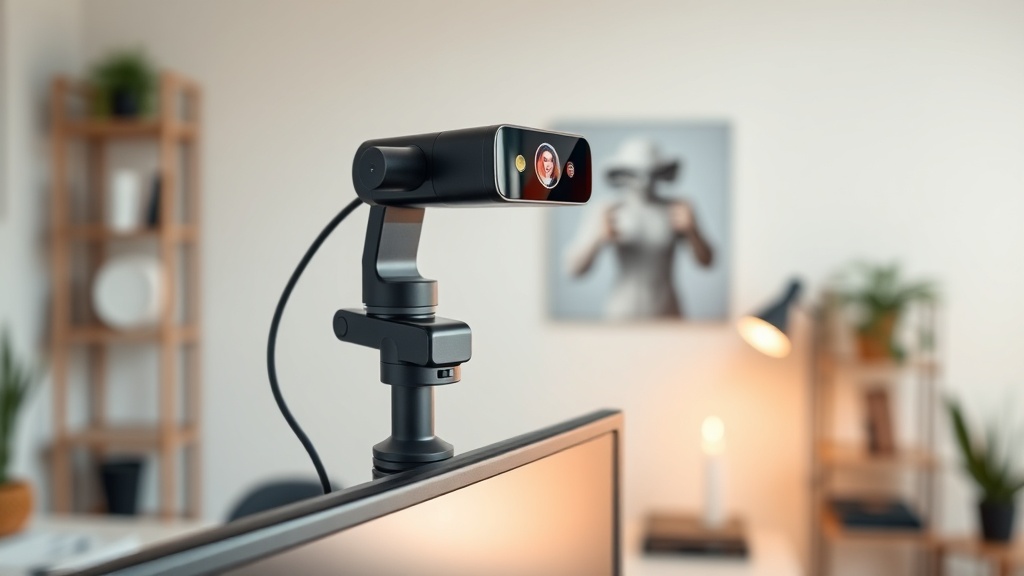
The Link 2 Pro is immediately identifiable by its form factor. Unlike the slim, rectangular webcams from Logitech and Elgato that clip onto a monitor and largely disappear, the Link 2 Pro sits atop a motorized 2-axis gimbal that gives the camera physical pan and tilt capability. The entire unit stands taller and has more visual presence than any competing webcam.
The camera module houses a 1/1.3-inch sensor — the largest in any webcam on the market. To put that in perspective, this sensor has 2.23 times the photosensitive area of the 1/2-inch sensor in the standard Insta360 Link 2, and it dwarfs the sensors in the Logitech MX Brio and Elgato Facecam Pro. Larger sensors capture more light and produce less noise, which translates directly to better image quality, especially in challenging lighting.
The lens has an f/1.9 aperture with a 24mm equivalent focal length, providing an 83.9-degree field of view. That is wide enough to capture your upper body and some background context without the extreme barrel distortion you see on ultra-wide webcams. Phase Detection Autofocus (PDAF) handles focus acquisition, and dual native ISO allows the camera to switch between two base ISO levels for optimal performance in different lighting conditions.
Build quality is solid. The base is weighted and stable on a desk, and the monitor clip holds firm on panels up to about 1.5 inches thick. A physical privacy shutter slides over the lens with a satisfying click — a feature we appreciate given that this camera has a motorized tracking system that is always ready to activate. The shutter provides physical assurance that the camera is blocked, not just software-disabled.
Connection is via USB-C, and the included cable is generously long at 1.5 meters. There is no USB-A adapter in the box, so you will need a dongle if your setup lacks USB-C ports.
Image Quality: Best in Class, and It Is Not Close
We tested the Link 2 Pro against the Logitech MX Brio 4K ($199), the Elgato Facecam Pro ($299), and the standard Insta360 Link 2 ($149) across multiple lighting scenarios: a well-lit office with overhead LED panels, a dim room with a single desk lamp, and a challenging backlit situation with a window behind the subject.
Well-Lit Conditions
In good lighting, all four webcams produce acceptable 4K images, but the Link 2 Pro immediately stands out. Skin tones are the most natural and accurate of the group, with none of the orange cast that the Logitech occasionally introduces or the slight coolness of the Elgato. Detail retention is exceptional — individual hairs, fabric texture, and background objects are rendered with a clarity that approaches what you would expect from a dedicated mirrorless camera on a tripod.
The 1/1.3-inch sensor's advantage is most apparent in dynamic range. In our backlit window test, the Link 2 Pro's HDR processing retained detail in both the bright window and the subject's face simultaneously. The Logitech MX Brio crushed the highlights or underexposed the face depending on its metering mode. The Elgato Facecam Pro handled backlight better than the Logitech but still lost highlight detail that the Link 2 Pro preserved.
Color science is natural and film-like. Insta360 has clearly tuned the processing pipeline to avoid the oversaturated, oversharpened look that many webcams default to. If you have ever noticed that you look slightly artificial on webcam compared to a phone camera or DSLR, the Link 2 Pro closes that gap.
Low-Light Performance
This is where the sensor size advantage becomes undeniable. In our dim desk-lamp scenario (approximately 50 lux), the Link 2 Pro produced a clean, usable image with minimal noise and accurate colors. The dual native ISO system kicks in automatically, switching to a higher base ISO that keeps noise low while maintaining exposure.
The Logitech MX Brio at the same light level showed visible grain, softened detail as noise reduction kicked in, and a noticeable color shift toward yellow. The Elgato Facecam Pro fared better than the Logitech but still could not match the Link 2 Pro's noise performance or detail retention.
For anyone who takes calls from a home office with imperfect lighting — which is most of us — the Link 2 Pro's low-light capability alone justifies its price premium.
Natural Bokeh
The Link 2 Pro's f/1.9 aperture and large sensor create a natural background blur that software-based bokeh effects cannot replicate. The falloff is smooth and gradual, with clean separation between the subject and background. Software bokeh, as implemented in Zoom and Teams, tends to create harsh edges around hair and occasionally blur parts of the subject. The Link 2 Pro's optical bokeh avoids these artifacts entirely.
You can still use software blur on top of the optical bokeh if you want more separation, but in our experience, the natural depth of field from the Link 2 Pro's optics alone produces a more professional, cinematic look than any software filter.
AI Tracking and Gimbal: The Defining Feature
The 2-axis gimbal is what separates the Link 2 Pro from every other webcam on the market. This is not digital crop-and-pan on a wide-angle image — the camera physically moves to follow you, maintaining full sensor resolution and image quality regardless of your position in the room.
How Tracking Works
When AI tracking is enabled, the Link 2 Pro uses on-device AI processing to identify and follow a subject. You can configure tracking for head, half-body, or full-body framing. The gimbal responds to movement smoothly and predictably, panning and tilting with the fluid motion you would expect from a human camera operator.
In our testing, we walked across a 10-foot space during a presentation, and the gimbal tracked us seamlessly with no jerky corrections or lost frames. The transition speed is well-calibrated — fast enough to keep up with natural walking pace, smooth enough to avoid the jarring snap-to-position behavior we have seen on cheaper motorized cameras.
You can also configure tracking zones and pause zones. A tracking zone defines the area where the camera will follow you. A pause zone is a designated area where the camera stops tracking and holds its position — useful if you want the camera to stay fixed when you are at your desk but track you when you stand up and move to a whiteboard.
Gesture Controls
Insta360 has built a comprehensive gesture control system that lets you operate the camera hands-free during presentations. Showing a palm to the camera and holding it toggles AI tracking on and off — a green LED flash confirms recognition. A V-sign (scissors gesture) activates whiteboard mode, which detects a whiteboard in the frame and reframes to highlight it. Gestures can also trigger zoom in, zoom out, and mode switching.
In practice, the gesture recognition is reliable about 85 percent of the time in our testing. It works best when you face the camera squarely and hold the gesture for a full second. Rapid or ambiguous hand movements occasionally fail to register. The success rate is high enough to be genuinely useful during presentations, but we occasionally fell back to the Insta360 Link Controller software for more precise control.
Whiteboard and Desk View Modes
Whiteboard mode is more than a gimmick. When activated, the camera identifies a whiteboard surface in the frame, reframes to center it, and applies perspective correction to present the whiteboard content as if captured from a head-on angle. Text on the board is legible and well-exposed, even if you are standing in front of it. The camera intelligently adjusts its framing to keep the whiteboard visible around your body.
Desk View tilts the gimbal downward to capture a top-down view of your workspace. This is invaluable for product demonstrations, craft tutorials, document walkthroughs, or any scenario where you need to show something on your desk during a call. The transition from face-to-face to desk view is smooth and can be triggered by gesture or through the software.
These modes convert the Link 2 Pro from a video call webcam into a presentation tool. No competitor offers anything equivalent without additional hardware.
Audio Performance
The Link 2 Pro features a dual-microphone array with directional beamforming and AI noise cancellation. Audio quality is strong for a webcam — voices are clear and well-separated from background noise, with natural tonality and good presence.
In our testing, the AI noise cancellation effectively suppressed keyboard clatter, fan noise, and background music without introducing noticeable artifacts on voice. It handled the constant low rumble of an air conditioner with no issues and reduced the volume of a conversation in an adjacent room to near-silence.
That said, the Link 2 Pro's microphones are still webcam microphones. A dedicated USB microphone or headset will deliver richer, more detailed audio with better bass response and less room reflections. For video calls where the other party is hearing you through laptop speakers, the Link 2 Pro's audio is more than adequate. For streaming or content creation where audio quality is critical, we recommend a dedicated microphone.
Software: Capable but Not Perfect
The Insta360 Link Controller software is available for macOS (M1 or later) and Windows. An important compatibility note: the software does not support Intel-based Macs. If you are running an older iMac or MacBook with an Intel processor, you will not be able to access the full feature set.
The software provides comprehensive control over image parameters — exposure, white balance, saturation, sharpness, contrast, and HDR can all be adjusted manually or left in automatic mode. You can configure tracking behavior, set tracking and pause zones, adjust gesture sensitivity, and save camera presets for different scenarios (video call, streaming, presentation).
The preset system is one of the software's strongest features. We created three presets: one for standard video calls with half-body framing and moderate exposure settings, one for streaming with a wider crop and boosted saturation, and one for presentations with full-body tracking and whiteboard mode ready. Switching between presets is instant, and the camera remembers your last-used preset between sessions.
The software also includes Insta360 InSight, an AI meeting assistant that can record meetings, generate transcripts, and produce AI-generated summaries combining visual highlights with text notes. We found InSight's transcription accuracy impressive for clear English speech, though it struggled with heavy accents and cross-talk in multi-person meetings.
The primary software frustration is occasional latency between adjusting settings and seeing the change reflected in the camera output. Exposure changes, for example, sometimes take 2-3 seconds to apply, which makes fine-tuning feel sluggish. This is a minor issue in normal use but becomes annoying when you are dialing in settings before a call.
Compatibility: Broad but With Caveats
The Link 2 Pro works as a standard UVC webcam, which means it is recognized natively by Zoom, Microsoft Teams, Google Meet, OBS Studio, Twitch, and virtually every other application that supports external webcams on both macOS and Windows. No drivers are required for basic operation — connect via USB-C and select the camera in your application.
However, the advanced features — AI tracking, gesture controls, whiteboard mode, desk view, and camera presets — require the Insta360 Link Controller software running in the background. Without the software, the Link 2 Pro functions as a high-quality fixed webcam without any of its distinguishing AI capabilities.
The 4K output requires a USB 3.0 or higher connection. Through USB 2.0, the maximum resolution drops to 1080p. At 4K, the maximum frame rate is 30fps. For 60fps output, you need to drop to 1080p resolution. In our experience, 4K at 30fps is the sweet spot for video calls and streaming — the resolution bump over 1080p is visible, and 30fps is sufficient for talking-head content.
Insta360 Link 2 Pro vs. the Competition
Vs. Logitech MX Brio 4K ($199)
The Logitech MX Brio is $50 cheaper and delivers solid 4K video in good lighting with a clean, understated design that blends into any monitor setup. Its software ecosystem is mature, and it integrates well with Logitech's broader peripheral lineup. For straightforward video calls from a fixed position in a well-lit office, the MX Brio is a very good webcam at a fair price.
But the image quality gap in anything less than ideal lighting is significant. The MX Brio's smaller sensor produces more noise in dim conditions, its auto-exposure is less reliable in mixed lighting, and it has no answer for the Link 2 Pro's gimbal tracking, gesture controls, or whiteboard mode. If you sit at your desk and never move during calls, the MX Brio saves you $50 and performs well. If your use extends beyond basic calls, the Link 2 Pro is in a different league.
Vs. Elgato Facecam Pro ($299)
The Elgato Facecam Pro costs $50 more than the Link 2 Pro and offers 4K at 60fps — the only webcam in this comparison that hits that spec. It appeals to streamers who want the highest possible frame rate for their face camera overlay. Image quality in good lighting is sharp and detailed, and the Elgato Camera Hub software provides extensive manual controls.
However, the Facecam Pro lacks any tracking capability, gesture controls, or presentation modes. It is a fixed camera that relies entirely on image quality and frame rate as differentiators. In our low-light testing, the Link 2 Pro's larger sensor produced a cleaner image. And the Elgato's auto-exposure and white balance have a reputation for inconsistency that we confirmed in our testing — occasional color shifts and exposure fluctuations that the Link 2 Pro handles more gracefully.
At $50 less with a larger sensor and dramatically more features, the Link 2 Pro is the better value unless 4K 60fps is an absolute requirement for your workflow.
Vs. Insta360 Link 2 ($149)
For buyers who want Insta360's gimbal tracking and AI features but do not need the absolute best image quality, the standard Link 2 is a compelling option at $100 less. It uses a 1/2-inch sensor instead of the Pro's 1/1.3-inch, which means less light gathering and more noise in dim conditions. It also lacks the dual native ISO and PDAF of the Pro model, relying on contrast-detect autofocus instead.
The tracking, gesture controls, and presentation modes are present on the Link 2 as well, making it a strong mid-range option. The Link 2 Pro is the upgrade for anyone who prioritizes image quality, particularly in imperfect lighting.
Who Should Buy the Insta360 Link 2 Pro?
The Link 2 Pro is built for people who spend a significant portion of their workday on camera. Remote workers who lead meetings, give presentations, or teach will benefit the most from the tracking, whiteboard, and desk view features. Content creators and streamers will appreciate the sensor size and image quality advantage over competing webcams. Anyone with a less-than-ideal lighting setup will notice the low-light performance improvement immediately.
If you take two or three short video calls per week from a desk and never move during them, the Link 2 Pro is more capability than you need. The Logitech MX Brio at $199 or even a $80 1080p webcam will serve you well.
But if video is a central part of your professional life — if you present, teach, demonstrate, stream, or create — the Link 2 Pro is the most capable webcam available, and the $249 investment pays for itself in the quality and flexibility it brings to every session.
The Verdict
The Insta360 Link 2 Pro does not just capture a better image than its competitors. It changes what a webcam can do. The AI-powered gimbal tracking turns a static frame into a dynamic, responsive view that follows your movement naturally. The whiteboard and desk view modes add genuine presentation utility that no other webcam matches. And the 1/1.3-inch sensor produces image quality that makes every other webcam look like a compromise.
At $249.99, it costs more than most people expect to spend on a webcam. But unlike the marginal improvements that separate most premium webcams from budget options, the Link 2 Pro delivers capabilities that are fundamentally different from and better than anything else on the market. For anyone who takes video seriously in their professional or creative life, it is the webcam to buy in 2026.
What We Liked
- Largest sensor in any webcam at 1/1.3 inches delivers outstanding image quality
- AI gimbal tracking is smooth and accurate, following movement seamlessly
- Phase Detection Autofocus locks on instantly and stays sharp during motion
- Dual native ISO and f/1.9 aperture produce excellent low-light performance
- Gesture controls, whiteboard mode, and desk view add genuine utility
What Could Improve
- At $249, it is significantly more expensive than most webcams
- Gimbal adds height and bulk compared to slim fixed webcams
- Software requires Mac M1 or later — no Intel Mac support
- 4K output limited to 30fps; 60fps requires dropping to 1080p
- Gimbal motor produces faint noise during rapid tracking movements
The Verdict
The Insta360 Link 2 Pro is the best webcam you can buy in 2026. The 1/1.3-inch sensor produces image quality that no competitor matches, and the AI-powered gimbal tracking transforms how you use a webcam — whether you are pacing during a presentation, demonstrating a product at your desk, or teaching in front of a whiteboard. The $249 price is justified if you spend significant time on video calls, streaming, or content creation. For basic Zoom calls from a fixed position, the Logitech MX Brio at $200 or the standard Insta360 Link 2 at $149 deliver strong value with fewer features. But if you want the best image and the smartest features, the Link 2 Pro has no equal.
Was this article helpful?
Join the conversation — sign in to leave a comment and engage with other readers.
Loading comments...
Related Posts
laptops
Apple MacBook Neo Review: A Real Mac for $599 That Redefines Budget Laptops
Apr 5, 2026audio
AirPods Max 2 Review: Better Where It Counts, Frustrating Where It Hasn't Changed
Apr 5, 2026laptops
2026 MacBook Air M5 Review: The Laptop Most People Should Buy
Apr 4, 2026smart-home
Aqara U400 Smart Lock Review: Ultra-Wideband Unlocking Changes Everything
Apr 4, 2026Enjoyed this article?
Get the best tech reviews, deals, and deep dives delivered to your inbox every week.